Git for Game Development: Source Control for Game Projects
Imagine a world where your game development team can collaborate seamlessly, where every change is tracked, and where reverting to a previous version is as easy as pressing a button. Sounds like a dream, right? Well, it's not! It's the power of Git, and it's a game-changer (pun intended) for game development.
Without a robust system for managing changes, game projects can quickly descend into chaos. Overwriting each other's work, losing crucial assets, and struggling to integrate new features become everyday battles. Imagine the frustration of spending hours on a new animation, only to have it overwritten by a teammate working on a different part of the game. Or worse, accidentally deleting essential game files with no way to recover them.
This blog post aims to unravel the mysteries of Git and show you how it can revolutionize your game development workflow. We'll explore the fundamentals of Git, discuss best practices for using it in game projects, and show how it can prevent these headaches from happening in the first place. Prepare to learn how Git can become your secret weapon for building better games, faster, and with less stress.
Essentially, we'll cover how Git addresses version control challenges in game development, highlighting its benefits for collaboration, tracking changes, and preventing data loss. We'll delve into practical applications, including branching strategies and handling large files, common in game projects. Get ready to master Git for game development!
Why Use Git for Game Development?
I remember the first time I worked on a game jam project. We were a small team of three, all relatively new to game development. We thought we could manage without any version control, just sharing files via Dropbox. Big mistake! Within hours, our project folder looked like a digital junkyard, with multiple copies of the same assets, conflicting code changes, and nobody quite sure what the "latest" version was. It was a nightmare trying to piece everything together, and we ended up losing hours of work due to simple overwrites.
That experience taught me a valuable lesson: version control is not optional, especially when working in a team. Git provides a structured way to manage changes, ensuring that everyone is working on the same version of the project and that no work is lost. With Git, you can easily track who made which changes, when they were made, and why. This makes it much easier to collaborate, debug issues, and revert to previous versions if something goes wrong. Furthermore, Git's branching capabilities allow you to experiment with new features without disrupting the main codebase, and its powerful merging tools make it easy to integrate changes from different branches.
For game developers, Git offers more than just basic version control. It's a tool that enables better collaboration, reduces errors, and ultimately helps you create higher-quality games. It's about preventing chaos and ensuring that your team can work together efficiently and effectively.
What is Git?
Git is a distributed version control system. That might sound like a mouthful, but it basically means that it tracks changes to your files over time, allowing you to revert to previous versions, compare changes, and collaborate with others on the same project. The "distributed" part means that every developer has a complete copy of the project's history on their local machine, making it possible to work offline and reducing the risk of data loss.
At its core, Git works by taking snapshots of your project at different points in time. Each snapshot, or "commit," represents a specific state of your project. These commits are stored in a repository, which is essentially a database of all the changes that have been made to your project. Git uses a branching model, allowing you to create different lines of development. This is incredibly useful for experimenting with new features or fixing bugs without disrupting the main codebase. Once you're happy with your changes, you can merge them back into the main branch.
Git is a command-line tool, but there are also many graphical user interfaces (GUIs) that make it easier to use. Tools like Git Hub Desktop, Source Tree, and Git Kraken provide a visual interface for managing your Git repositories. Whether you prefer the command line or a GUI, Git is an essential tool for any game developer who wants to work efficiently and collaboratively.
The History and Mythology of Git
Git was created by Linus Torvalds in 2005, the same person who created the Linux operating system. He needed a distributed version control system to manage the development of the Linux kernel, and none of the existing tools met his needs. So, he decided to build his own. The initial goal was to create a system that was fast, reliable, and capable of handling large codebases. And it worked!
One of the myths surrounding Git is that it's incredibly complex and difficult to learn. While it's true that Git has a steep learning curve, especially for beginners, the basic concepts are relatively straightforward. Once you understand the core principles of branching, committing, and merging, you can start using Git effectively in your game development projects. There are countless online resources, tutorials, and communities that can help you learn Git, and with practice, you'll become more comfortable with its intricacies.
Git has become the de facto standard for version control in software development, and it's widely used in the game industry as well. From indie studios to AAA game developers, Git is an essential tool for managing code, assets, and everything else that goes into creating a game. It's a testament to the power and flexibility of Git that it has become such a dominant force in the software development world.
The Hidden Secrets of Git for Game Development
One of the often-overlooked secrets of Git in game development is its ability to handle large binary files efficiently. Game projects often involve large assets like textures, audio files, and 3D models, which can quickly bloat your repository. Git Large File Storage (LFS) is an extension that allows you to store these large files separately from your Git repository, while still tracking changes to them. This keeps your repository lean and prevents performance issues.
Another hidden secret is Git's powerful branching capabilities. Game developers can use branches to experiment with new features, implement different gameplay mechanics, or fix bugs without disrupting the main codebase. This allows for parallel development and reduces the risk of introducing errors into the production version of the game. By using a branching strategy, teams can work more efficiently and iterate more quickly.
Git's flexibility and extensibility make it a powerful tool for game development. By understanding its hidden secrets and leveraging its advanced features, you can optimize your workflow and create better games. It's not just about tracking changes; it's about empowering your team to collaborate more effectively and build amazing experiences.
Recommendations for Using Git in Game Development
My top recommendation for using Git in game development is to establish a clear branching strategy. A well-defined branching strategy helps to organize your workflow, manage changes, and prevent conflicts. A common approach is to use a "main" or "master" branch for the production version of the game, a "develop" branch for ongoing development, and feature branches for implementing new features or fixing bugs.
Another key recommendation is to commit frequently and with meaningful messages. Each commit should represent a logical change to the project, and the commit message should clearly describe what was changed and why. This makes it easier to track down bugs, revert to previous versions, and understand the history of the project. Use descriptive names for your branches and tags to easily identify the purpose and state of each.
It's also important to use a .gitignore file to exclude unnecessary files from your repository, such as build artifacts, temporary files, and user-specific settings. This helps to keep your repository clean and reduces the risk of accidentally committing sensitive information. By following these recommendations, you can get the most out of Git and improve your game development workflow.
Dealing with Binary Files
Game development often involves working with large binary files such as textures, models, and audio assets. These files can be problematic for Git, as it's designed primarily for text-based files. Storing large binary files directly in your Git repository can lead to performance issues and increase the size of your repository significantly. This is where Git Large File Storage (LFS) comes into play.
Git LFS is an extension that allows you to store large files separately from your Git repository, while still tracking changes to them. It works by replacing the large files with pointer files in your repository, which point to the actual files stored on a separate server. When you clone or checkout a repository with Git LFS enabled, the pointer files are automatically replaced with the actual files. This allows you to work with large files without bloating your repository or slowing down your workflow.
To use Git LFS, you need to install the Git LFS client and initialize it in your repository. Then, you can track the large files you want to store with LFS using the git lfs track command. Once you've tracked the files, you can commit and push them to your remote repository as usual. Git LFS will automatically handle the storage and retrieval of the large files, making it seamless to work with them in your game development projects.
Tips for Using Git Effectively in Game Development
One of the best tips for using Git effectively in game development is to embrace the power of branching. Create a new branch for each new feature, bug fix, or experiment. This allows you to isolate your changes from the main codebase and prevents you from accidentally breaking things. Once you're happy with your changes, you can merge them back into the main branch.
Another tip is to use a .gitignore file to exclude unnecessary files from your repository. This helps to keep your repository clean and reduces the risk of accidentally committing sensitive information. Common files to exclude include build artifacts, temporary files, and user-specific settings. This can be done by creating a `.gitignore` file in the root of your project and adding the patterns of files you want to ignore.
It's also important to communicate with your team about your Git workflow. Establish clear guidelines for branching, committing, and merging. This helps to ensure that everyone is on the same page and reduces the risk of conflicts. A well-defined Git workflow can significantly improve your team's productivity and collaboration.
Resolving Merge Conflicts
Merge conflicts are inevitable when working with Git, especially when multiple developers are working on the same files simultaneously. A merge conflict occurs when Git is unable to automatically merge changes from two different branches because they conflict with each other. When a merge conflict occurs, Git marks the conflicting sections in the file with special markers, indicating where the changes need to be resolved.
To resolve a merge conflict, you need to manually edit the file and decide which changes to keep. You can use a visual merge tool to help you compare the changes and make the necessary decisions. Once you've resolved the conflict, you need to remove the conflict markers and commit the changes. It's important to communicate with your team when resolving merge conflicts to ensure that everyone is aware of the changes being made.
Resolving merge conflicts can be challenging, but it's an essential skill for any game developer using Git. By understanding how merge conflicts occur and how to resolve them, you can minimize the disruption they cause and keep your project moving forward.
Fun Facts About Git
Did you know that Git was originally designed to be a low-level toolkit, rather than a user-friendly version control system? Linus Torvalds famously said that he wanted Git to be "evil and distributed," and that it should be "stupidly simple" internally, but "amazingly powerful" externally. This design philosophy has contributed to Git's flexibility and extensibility, but it has also made it more challenging to learn for beginners.
Another fun fact is that the name "Git" is a British slang term for an unpleasant person. Linus Torvalds chose the name because he thought it was fitting for a tool that was designed to be "stupid" and "unpleasant" internally. Despite the name, Git has become one of the most popular and widely used version control systems in the world.
Git is not just for software development; it's also used in many other fields, including web development, data science, and even writing and documentation. Its ability to track changes and collaborate with others makes it a valuable tool for any project that involves multiple contributors. The versatility of Git makes it an invaluable asset in today's collaborative digital landscape.
How to Set Up Git for Your Game Project
Setting up Git for your game project is a straightforward process. First, you need to install Git on your machine. You can download the latest version of Git from the official Git website. Once Git is installed, you can create a new Git repository for your game project.
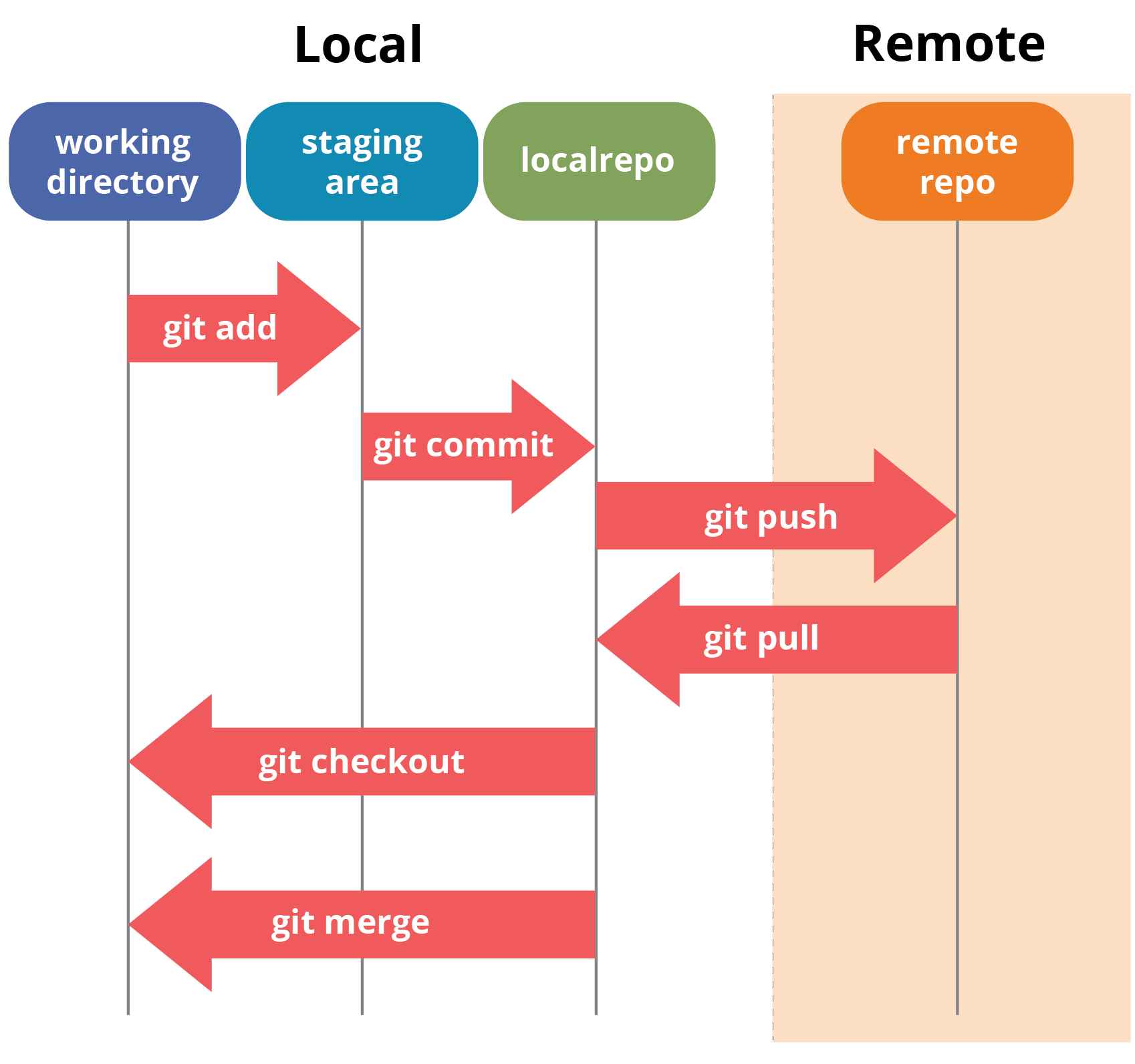
To create a new Git repository, navigate to your project directory in the command line and run the git init command. This will create a new .git directory in your project directory, which contains all the Git metadata for your project. Next, you need to add your project files to the Git repository. You can do this using the git add command.
After adding your files, you can commit them to the Git repository using the git commit command. Be sure to write a meaningful commit message that describes the changes you've made. Finally, you can push your Git repository to a remote repository, such as Git Hub, Git Lab, or Bitbucket. This allows you to collaborate with others on your game project and back up your code.
What If You Don't Use Git?
If you choose not to use Git for your game development project, you're essentially opting for a more manual and potentially chaotic approach to version control. Without Git, you'll likely be relying on manual backups, shared folders, and informal communication to manage changes to your project. This can lead to several problems, including lost work, conflicting changes, and difficulty collaborating with your team.
Without a proper version control system, it's easy to accidentally overwrite someone else's work or lose track of the changes that have been made. This can result in wasted time, frustration, and even project delays. Git provides a structured and reliable way to manage changes, ensuring that everyone is working on the same version of the project and that no work is lost. Imagine the nightmare of losing critical game assets or having unexplainable bugs because you skipped version control.
While it's possible to develop games without Git, it's not recommended, especially for larger or collaborative projects. Git provides a level of organization, control, and collaboration that is simply not possible with manual methods. By using Git, you can streamline your workflow, reduce errors, and ultimately create better games.
Top 5 Benefits of Using Git for Game Development
Here's a quick list of the top 5 benefits of using Git for game development:
- Collaboration: Git makes it easy for multiple developers to work on the same project simultaneously without interfering with each other's work.
- Version Control: Git tracks every change made to your project, allowing you to revert to previous versions if something goes wrong.
- Branching: Git allows you to create different branches for new features, bug fixes, or experiments, without disrupting the main codebase.
- Backup and Recovery: Git provides a reliable way to back up your project and recover from accidental data loss.
- Improved Workflow: Git streamlines your development workflow, making it easier to manage changes, resolve conflicts, and collaborate with your team.
Question and Answer
Here are some frequently asked questions about using Git for game development:
Q: Is Git difficult to learn?
A: Git has a steep learning curve, especially for beginners, but the basic concepts are relatively straightforward. With practice and the help of online resources, you can become proficient in Git.
Q: What is Git LFS?
A: Git LFS (Large File Storage) is an extension that allows you to store large files, such as textures and 3D models, separately from your Git repository. This helps to keep your repository lean and prevents performance issues.
Q: How do I resolve merge conflicts in Git?
A: To resolve a merge conflict, you need to manually edit the conflicting file and decide which changes to keep. You can use a visual merge tool to help you compare the changes and make the necessary decisions.
Q: What is a .gitignore file?
A: A .gitignore file is a text file that specifies intentionally untracked files that Git should ignore. This is useful for excluding build artifacts, temporary files, and user-specific settings from your repository.
Conclusion of Git for Game Development: Source Control for Game Projects
In conclusion, Git is an indispensable tool for game development. It fosters collaboration, meticulously tracks changes, and provides a safety net against data loss. By adopting a clear branching strategy, committing frequently with informative messages, and utilizing Git LFS for large assets, game developers can significantly enhance their workflow and create high-quality games more efficiently. Mastering Git is not just about learning a tool; it's about empowering your team to build better games, together.
Post a Comment