Godot Game Engine: Open Source Game Development Tutorial
Ever dreamed of crafting your own video game but felt overwhelmed by complicated coding and expensive software? You're not alone! The world of game development can seem like an exclusive club, guarded by complex programming languages and hefty price tags. But what if I told you there was a way to break down those barriers and bring your game ideas to life, without breaking the bank or needing a computer science degree?
Many aspiring game developers face obstacles. High software costs can be prohibitive, especially for beginners. The complexity of some game engines can be daunting, leading to frustration and abandoned projects. Finding accessible, comprehensive tutorials that cater to different skill levels can also feel like searching for a needle in a haystack.
This guide is for anyone eager to learn game development using a powerful, free, and open-source engine: Godot! Whether you're a complete beginner with no prior experience or a seasoned programmer looking to explore a new engine, this tutorial will provide a clear and comprehensive roadmap to get you started.
This article will explore the Godot game engine, a fantastic open-source tool for creating 2D and 3D games. We'll delve into its features, benefits, and how it empowers developers of all skill levels. We will cover everything from getting started with the engine to creating your first game, exploring GDScript, understanding scenes and nodes, and finding resources to continue your learning journey. Whether you're interested in 2D platformers, 3D adventures, or even mobile games, Godot offers a versatile and accessible platform to bring your vision to life. So, buckle up, and let's embark on this exciting game development adventure!
Why Choose Godot?
My journey into game development started with a similar feeling of being overwhelmed. I had a game idea simmering for years, but the software felt so complicated. I tried other engines, but the learning curve felt like climbing a vertical cliff. Then, I stumbled upon Godot, and something clicked. The interface felt intuitive, the node-based system made sense, and the fact that it was completely free and open-source was a game-changer (pun intended!). It felt like a breath of fresh air in the often-expensive and complex world of game development.
Godot stands out due to its open-source nature, meaning it's free to use, distribute, and even modify! This eliminates the financial barrier that often prevents aspiring developers from getting started. Furthermore, its lightweight design ensures it runs smoothly on a wide range of hardware, making it accessible to developers with older or less powerful computers. Godot’s scene-based workflow, where games are built from reusable components called nodes, simplifies the development process. Godot’s scripting language, GDScript, is similar to Python, which makes it easier to learn and use than some other game engine languages. The engine is equally adept at handling both 2D and 3D projects, making it a versatile choice for various game genres. With a supportive community and an abundance of learning resources, Godot lowers the barriers to entry and empowers anyone with a passion for games to start creating.
What is Godot?
Godot is more than just a game engine; it's a complete game development environment. Think of it as a toolbox filled with everything you need to create games, from basic tools like asset management and scene editing to more advanced features like physics engines, networking capabilities, and animation systems. It allows you to design your game's world, program its logic, create its visuals, and even package it for different platforms, all within a single, unified interface.
At its core, Godot is built around the concept of "scenes" and nodes.A scene is a collection of nodes arranged in a hierarchical structure. Each node represents a specific element of your game, such as a sprite, a camera, a sound effect, or a script. By combining and arranging these nodes, you can build complex game mechanics and interactive environments. GDScript is a crucial aspect of Godot. It is a high-level, dynamically typed scripting language designed specifically for Godot. It allows developers to write game logic, control node behavior, and create interactions between different game elements. GDScript is easy to learn, especially for those familiar with languages like Python. Godot also supports C# as an alternative scripting language, offering more flexibility and performance for experienced programmers. Godot simplifies the exporting process, enabling developers to deploy their games to various platforms, including Windows, mac OS, Linux, Android, i OS, and the web. This multi-platform support broadens the audience and makes it easier to share your creations with the world.
The History and Myth of Godot
The story of Godot is fascinating, a tale of perseverance, passion, and a commitment to open-source principles. It was initially developed by Juan Linietsky and Ariel Manzur at a small Argentinian company called OKAM Studio. They created it to overcome the limitations of existing game development tools and to streamline their own game creation process. For many years, Godot was used internally at OKAM Studio, powering a variety of commercial games. However, in 2014, the developers made the bold decision to release Godot as a free and open-source engine under the MIT license.
This marked a turning point for Godot, as it opened the engine up to a global community of developers who contributed code, bug fixes, and new features. This collaborative effort fueled Godot's rapid growth and development. One popular myth surrounding Godot is that its name is a reference to Samuel Beckett's play "Waiting for Godot." The play revolves around two characters who are endlessly waiting for someone named Godot, who never arrives. The engine's creators have acknowledged this inspiration, suggesting that the name reflects the long wait for a game engine that truly met their needs. The name also highlights the potential for endless possibilities within the engine, as developers can constantly create and "wait" for their game ideas to come to fruition. Godot's open-source nature fosters a supportive and collaborative community. Developers can share their knowledge, contribute to the engine's development, and help each other overcome challenges. This sense of community has been crucial to Godot's success and continues to attract new users to the engine.
The Hidden Secrets of Godot
While Godot is known for its user-friendly interface and straightforward workflow, it also holds several hidden gems that can significantly enhance your development experience. These aren't necessarily "secrets" in the traditional sense, but rather lesser-known features and techniques that can unlock new possibilities and streamline your workflow. One of these gems is the powerful Animation Player node. Beyond simple sprite animations, the Animation Player can be used to animate almost any property of any node in your scene. This allows you to create complex cinematic sequences, dynamic UI elements, and intricate game mechanics without writing a single line of code.
Another often-overlooked feature is Godot's built-in shader editor. Shaders are small programs that run on the GPU and control how objects are rendered on the screen. With Godot's shader editor, you can create custom visual effects, from subtle color adjustments to complex distortions and lighting effects. Godot's signal system is a hidden superpower that enables efficient communication between different parts of your game. Signals allow nodes to broadcast events to other nodes, triggering actions and creating dynamic interactions. This system is particularly useful for creating responsive UI elements, handling player input, and managing complex game logic. Godot allows you to extend the engine's functionality by creating custom nodes and editor tools. This enables you to tailor the engine to your specific needs and create a more efficient and personalized development environment. By exploring these hidden secrets, you can unlock the full potential of Godot and take your game development skills to the next level.
Recommendations for Learning Godot
Learning a new game engine can be daunting, but with the right approach and resources, you can quickly become proficient in Godot. My first recommendation is to start small. Don't try to create your dream game right away. Instead, focus on creating simple projects that allow you to learn the fundamentals of the engine. A classic "Hello World" program, a simple 2D platformer, or a basic 3D scene can be excellent starting points. Numerous online tutorials and courses cater specifically to Godot. The official Godot documentation is comprehensive and well-organized, providing detailed explanations of all the engine's features. Websites like Udemy, Coursera, and You Tube offer a wealth of video tutorials covering various aspects of Godot development.
The Godot community is incredibly active and supportive. The Godot Engine subreddit, the Godot forums, and the Godot Discord server are excellent places to ask questions, share your work, and connect with other developers. Don't be afraid to experiment and try new things. Godot is a very forgiving engine, and you can learn a lot by simply playing around with its features and seeing what happens. Don't get discouraged if you encounter challenges. Game development is a complex process, and everyone faces obstacles along the way. The key is to persevere, seek help when you need it, and celebrate your successes, no matter how small. Also, consider joining a game jam! These are events where you have a limited amount of time (usually a weekend) to create a game based on a specific theme. Game jams are a great way to learn new skills, collaborate with other developers, and push yourself creatively. By following these recommendations and dedicating yourself to learning, you can master Godot and bring your game ideas to life.
Understanding Scenes and Nodes
At the heart of Godot lies the scene and node system. Think of a scene as a blueprint for a specific part of your game, such as a level, a character, or a UI element. Each scene is composed of a hierarchy of nodes, where each node represents a specific element within that scene. A node can be anything from a sprite (an image displayed on the screen) to a camera, a sound effect, a collision shape, or a script. Each node has its own properties, which determine its behavior and appearance. For example, a sprite node might have properties for its texture, its position, and its scale.
The hierarchical structure of nodes allows you to create complex game objects by combining simpler ones. For example, you might create a player character scene by combining a sprite node for the character's appearance, a collision shape node for detecting collisions, and a script node for controlling the character's movement. Godot comes with a wide variety of built-in node types, but you can also create your own custom nodes using GDScript or C#. This allows you to extend the engine's functionality and tailor it to your specific needs. Scenes can be instantiated (created) multiple times in your game, allowing you to reuse the same scene for multiple characters, enemies, or objects. This promotes code reusability and makes it easier to manage complex game projects. By understanding the scene and node system, you can effectively organize your game's structure, create reusable components, and build complex game mechanics with ease.
Tips and Tricks for Godot Development
As you delve deeper into Godot development, you'll discover a wealth of tips and tricks that can streamline your workflow and enhance your game's performance. One essential tip is to embrace Godot's signal system. Signals allow nodes to communicate with each other without direct references, promoting loose coupling and making your code more modular and maintainable. For example, you can use signals to trigger animations, play sound effects, or update UI elements when a specific event occurs in your game. Optimize your game's performance by using efficient coding practices. Avoid unnecessary calculations, reuse resources whenever possible, and profile your code to identify bottlenecks. Godot provides several tools for profiling your game, including a built-in profiler and a performance monitor.
Take advantage of Godot's built-in debugging tools. The debugger allows you to step through your code, inspect variables, and identify errors. Godot also provides a range of error messages and warnings that can help you troubleshoot problems. Consider using version control, such as Git, to manage your project. Version control allows you to track changes to your code, revert to previous versions, and collaborate with other developers. Experiment with different node combinations and scripting techniques to discover new and creative ways to implement your game mechanics. Godot is a very flexible engine, and there are often multiple ways to achieve the same result. Learn to use Godot's input system effectively. The input system allows you to handle player input from various sources, such as keyboards, mice, gamepads, and touchscreens. By using the input system efficiently, you can create responsive and intuitive controls for your game. Master these tips and tricks, and you'll be well on your way to becoming a proficient Godot developer.
Understanding GDScript
GDScript is Godot's built-in scripting language, designed to be easy to learn and use while still providing the power and flexibility needed for complex game development. It shares similarities with Python, making it accessible to beginners while offering advanced features for experienced programmers. One of GDScript's key features is its dynamic typing system. This means you don't need to explicitly declare the type of a variable; the interpreter infers the type based on the value assigned to it. This simplifies the coding process and reduces the amount of boilerplate code you need to write.
GDScript supports object-oriented programming principles, allowing you to create classes, inherit from other classes, and use polymorphism. This enables you to organize your code into reusable components and create complex game mechanics in a structured way. Signals are a core feature of GDScript and Godot in general. They allow nodes to communicate with each other without direct references, promoting loose coupling and making your code more modular and maintainable. GDScript provides several built-in functions and classes that simplify common game development tasks, such as handling input, manipulating vectors, and playing sound effects. You can extend GDScript by creating your own custom functions and classes. This allows you to tailor the language to your specific needs and create reusable components for your game. Mastering GDScript is essential for anyone who wants to develop games with Godot. By understanding its syntax, features, and best practices, you can effectively control your game's logic, create dynamic interactions, and bring your game ideas to life.
Fun Facts About Godot
Beyond its technical capabilities, Godot boasts some interesting and quirky facts that make it a unique and endearing game engine. Did you know that Godot's mascot is a small, orange, androgynous creature named "Godette"? Godette represents the engine's playful and approachable nature. The original Godot developers, Juan Linietsky and Ariel Manzur, worked on the engine for several years in their spare time before releasing it as open-source. This dedication and passion are reflected in the engine's design and functionality. Godot has been used to create a wide variety of games, ranging from small indie projects to commercial titles. This demonstrates the engine's versatility and its ability to handle different game genres and development styles.
Godot's community is incredibly active and supportive, with developers from all over the world contributing to the engine's development and providing assistance to new users. This collaborative spirit is a testament to the power of open-source software. The Godot Engine subreddit is a treasure trove of information, tutorials, and community support. The name "Godot" is inspired by Samuel Beckett's play "Waiting for Godot," which reflects the long wait the developers endured before finding a game engine that truly met their needs. Godot has a unique node-based architecture, which allows developers to create complex game mechanics by combining simpler building blocks. This makes it easy to organize your game's structure and create reusable components. Godot's scripting language, GDScript, is designed to be easy to learn and use, making it accessible to beginners while still providing the power and flexibility needed for complex game development. These fun facts highlight Godot's unique personality and its strong community, making it a truly special game engine.
How to Get Started with Godot
Embarking on your Godot journey is easier than you might think. The first step is to download the engine from the official Godot Engine website (godotengine.org). Godot is available for Windows, mac OS, and Linux, and it comes in both standard and Mono (C#) versions. Choose the version that best suits your needs and operating system. Once you've downloaded Godot, simply extract the archive and run the executable. Godot doesn't require any installation; it's a self-contained application. When you launch Godot, you'll be greeted with the project manager. This is where you create, open, and manage your Godot projects.
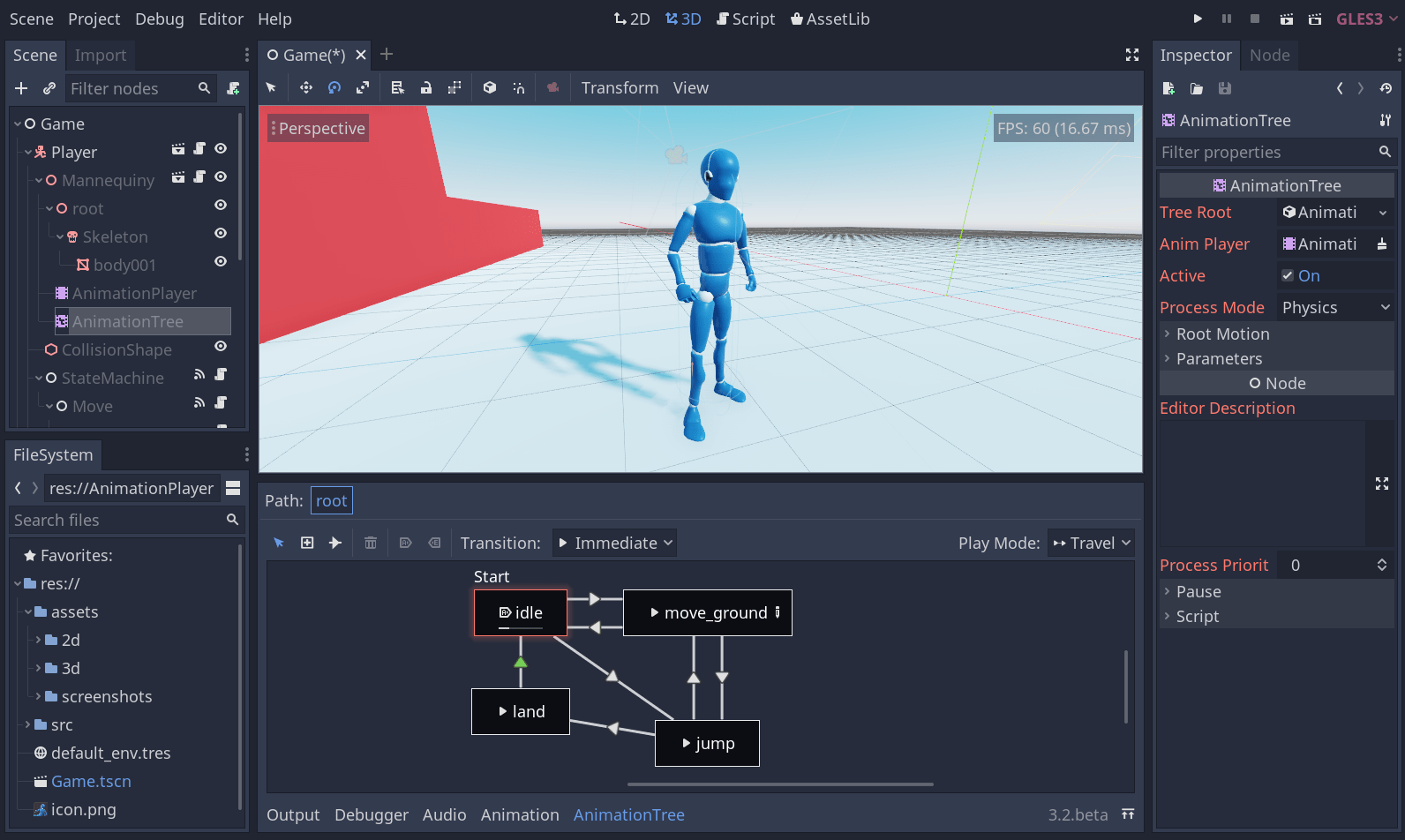
To create a new project, click the "New Project" button, choose a name and location for your project, and select a renderer (either "Forward+ " or "Mobile"). Godot will then create a new project folder and open the main editor window. The Godot editor is divided into several panels, including the scene tree, the inspector, the editor viewport, and the script editor. Take some time to familiarize yourself with the layout and the different panels. The scene tree displays the hierarchy of nodes in your current scene. The inspector allows you to view and modify the properties of selected nodes. The editor viewport is where you design your game's visuals and layout. And the script editor is where you write GDScript code to control your game's logic. Start by creating a simple scene with a few nodes, such as a sprite and a camera. Then, write a simple GDScript to control the sprite's movement. Experiment with different node properties and scripting techniques to get a feel for how Godot works. Remember to refer to the official Godot documentation and online tutorials for guidance. By following these steps, you'll be well on your way to creating your first Godot game.
What If You're Stuck with Godot?
Even with the best tutorials and resources, you're bound to encounter challenges during your Godot development journey. The key is to not get discouraged and to know where to turn for help. First and foremost, consult the official Godot documentation. It's a comprehensive resource that covers all aspects of the engine, from basic concepts to advanced techniques. Use the search function to quickly find information on specific topics. Search online! Chances are someone else has already encountered the same problem you're facing and has found a solution.
Don't be afraid to ask for help on the Godot forums, the Godot Engine subreddit, or the Godot Discord server. The community is incredibly active and supportive, and there are always experienced developers willing to lend a hand. When asking for help, be as specific as possible about the problem you're facing, and provide relevant code snippets or screenshots. This will make it easier for others to understand your issue and offer helpful advice. Take a break and clear your head. Sometimes, stepping away from the problem for a while can help you see it from a fresh perspective. Try a rubber duck debugging. Explain your code to an inanimate object. This can often help you identify errors or inconsistencies in your logic. By following these tips and seeking help when you need it, you can overcome any challenge and continue to progress on your Godot development journey.
List of Resources for Learning Godot
To help you along your Godot learning path, here's a curated list of resources:
Official Godot Documentation: This is the most comprehensive resource for learning about Godot. It covers all aspects of the engine in detail, from basic concepts to advanced techniques. Godot Engine Website: The official website is the place to download the engine, find news and updates, and access the documentation. Godot Engine Subreddit: A very active community on Reddit where you can ask questions, share your projects, and get feedback from other developers. Godot Forums: Another great place to ask questions, discuss Godot-related topics, and connect with other developers. Godot Discord Server: A real-time chat platform where you can get instant help and connect with the Godot community. Udemy Courses: Udemy offers a wide range of Godot courses, from beginner-friendly introductions to advanced tutorials. You Tube Channels: Several You Tube channels offer Godot tutorials, including Kids Can Code, GDQuest, and Heart Beast. These channels provide a wealth of free content for learning Godot. Godot Asset Library: A collection of free and open-source assets that you can use in your Godot projects. This includes textures, models, scripts, and other resources. By utilizing these resources, you can accelerate your learning process and become a proficient Godot developer in no time.
Question and Answer
Q: Is Godot suitable for beginners?
A: Absolutely! Godot's user-friendly interface, GDScript language, and extensive documentation make it an excellent choice for beginners with little to no prior programming experience.
Q: Can I create commercial games with Godot?
A: Yes! Godot's MIT license allows you to use the engine for both personal and commercial projects without any royalties or fees.
Q: What types of games can I create with Godot?
A: Godot is a versatile engine that can be used to create a wide variety of games, including 2D platformers, 3D adventures, puzzle games, and mobile games.
Q: Does Godot support multiplayer game development?
A: Yes, Godot has built-in networking capabilities that allow you to create multiplayer games. It supports both client-server and peer-to-peer architectures.
Conclusion of Godot Game Engine: Open Source Game Development Tutorial
Godot is a fantastic game engine that empowers developers of all skill levels to bring their game ideas to life. Its open-source nature, user-friendly interface, and versatile features make it an ideal choice for both beginners and experienced programmers. By embracing the resources and tips outlined in this guide, you can embark on your Godot journey with confidence and create amazing games. So, download Godot, start experimenting, and unleash your creativity!
Post a Comment