Unity HDRP Tutorial: High Definition Render Pipeline
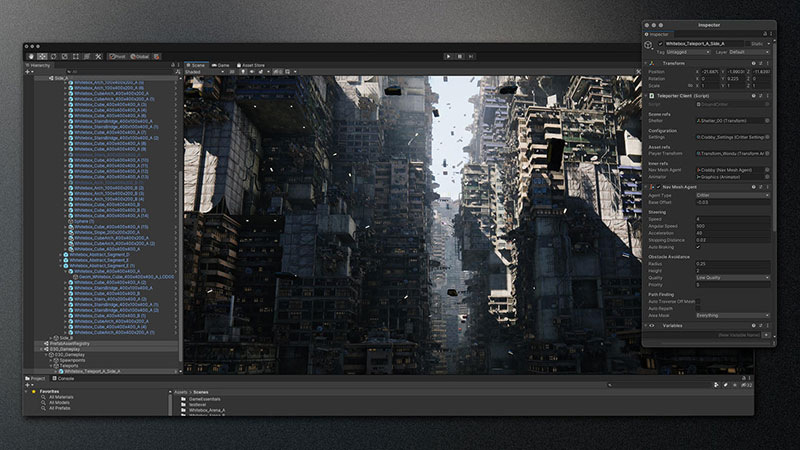
Have you ever looked at a game and wondered, "How did they make it look so unbelievably real?" Chances are, the developers leveraged a powerful rendering pipeline like the High Definition Render Pipeline (HDRP) in Unity. This technology allows for stunning visuals, pushing the boundaries of what's possible in real-time rendering. But diving in can feel like staring into the abyss – a vast and complex world of settings, shaders, and techniques.
Many developers find themselves struggling to achieve the promised visual fidelity of HDRP. Common hurdles include performance issues, unexpected visual glitches, and a steep learning curve when trying to master the new workflows and features. Figuring out the optimal settings for specific hardware configurations and art styles can be a major time sink, leading to frustration and potentially hindering project progress.
This comprehensive guide aims to demystify the Unity HDRP, providing a clear and accessible path to creating visually stunning games and experiences. We'll break down the core concepts, explore essential settings, and provide practical tips and tricks to help you unlock the full potential of this powerful rendering pipeline. Whether you're a seasoned Unity veteran or just starting your journey, this tutorial will equip you with the knowledge and confidence to master HDRP.
In this article, we'll cover the fundamentals of Unity's HDRP, its purpose, and its implementation. We will explore topics such as setting up HDRP in your project, understanding key features like volumetric lighting and screen-space reflections, and optimizing performance for various platforms. By following this guide, you'll be able to create stunning visuals and take your Unity projects to the next level. Get ready to dive into the world of high-fidelity rendering!
My First Encounter with HDRP
I remember my first attempt at using HDRP. I was working on a small indie project, a stylized adventure game. I thought, "HDRP will make it look amazing!" I naively switched the project over, and suddenly, everything was a washed-out, blurry mess. My carefully crafted lighting was gone, and performance tanked to single-digit frame rates. It was a disaster! I quickly reverted back to the Standard Render Pipeline, feeling defeated. It took me a while to understand that HDRP isn't just a simple "upgrade". It's a fundamentally different way of rendering, requiring a completely different approach to lighting, materials, and post-processing. This experience taught me the importance of proper planning and understanding the nuances of the pipeline. HDRP demands a shift in thinking. You have to consider things like physical light units (lux instead of arbitrary intensity values), physically based materials (PBR), and global illumination techniques. Once I started approaching it with this mindset, things started to click. I learned how to use the various settings to fine-tune the visuals, optimize performance by tweaking shadow cascades and post-processing effects, and ultimately achieve the stunning results I initially envisioned. The journey wasn't easy, but the rewards were well worth the effort. I think understanding how global illumination works, specifically in the context of HDRP, is essential to creating a visually appealing scene. It really sells the realism of any environment, and when paired with physically based rendering, it allows materials to react realistically to the light.
What Exactly is HDRP?
Unity's High Definition Render Pipeline (HDRP) is a modern rendering pipeline designed to achieve high-fidelity graphics on compatible platforms. Unlike the built-in Standard Render Pipeline (now called the Built-in Render Pipeline), HDRP leverages advanced rendering techniques like physically based rendering (PBR), volumetric lighting, and real-time global illumination to create photorealistic visuals. It provides a range of customizable settings, allowing developers to fine-tune the rendering process to achieve specific art styles and optimize performance for their target hardware. Essentially, HDRP gives you a significantly more powerful and flexible toolkit for creating visually impressive games and applications. This includes features like deferred rendering, which allows for a large number of lights in a scene without significant performance overhead. It also provides more advanced shadowing techniques, such as contact shadows and raytraced shadows (on supported hardware). In addition, HDRP offers a robust post-processing stack, enabling developers to easily implement filmic color grading, bloom, and other visual effects. These features, combined with the overall architecture of the pipeline, make HDRP the go-to choice for projects that prioritize visual quality and realism. However, it's crucial to remember that HDRP comes with a higher performance cost compared to the Built-in Render Pipeline, so careful optimization is essential.
The Evolution of HDRP: A Brief History
The High Definition Render Pipeline emerged as a response to the growing demand for more realistic and visually stunning games. Prior to HDRP, Unity relied on the Standard Render Pipeline, which, while versatile, was limited in its ability to handle advanced rendering techniques. HDRP was initially conceived as part of Unity's Scriptable Render Pipeline (SRP) initiative, which aimed to provide developers with greater control over the rendering process. The early versions of HDRP were experimental and primarily focused on demonstrating the capabilities of the SRP architecture. However, as development progressed, HDRP became a fully-fledged rendering pipeline, incorporating features like PBR, volumetric lighting, and real-time global illumination. Over time, Unity has continued to refine and improve HDRP, adding new features and optimizing performance. Today, it's a mature and widely used rendering pipeline, powering some of the most visually impressive Unity games and applications. There's a common misconception that HDRP is only suitable for high-end hardware. While it's true that HDRP requires more powerful hardware than the Built-in Render Pipeline, it's also highly configurable, allowing developers to adjust settings and features to optimize performance for a wider range of platforms. With careful optimization, it's possible to achieve impressive visuals on mid-range PCs and even some consoles.
Unlocking HDRP's Hidden Potential
One of the often overlooked aspects of HDRP is its extensive customization options. While the default settings can produce impressive results, truly unlocking the pipeline's potential requires diving into the various configuration files and shader graphs. For example, you can create custom lighting models to achieve unique visual styles that deviate from traditional photorealism. You can also modify the post-processing stack to create custom effects that enhance the overall look and feel of your game. Furthermore, HDRP's shader graph integration allows you to create complex and highly optimized shaders without writing any code. This gives artists and technical artists greater control over the visual appearance of their assets. Another secret to mastering HDRP is understanding the importance of proper asset creation. HDRP relies heavily on physically based rendering (PBR), which means that your textures and materials need to be created with realistic values in mind. Using high-quality textures and carefully calibrating material properties like albedo, roughness, and metallic is crucial for achieving realistic visuals. Ignoring these details can lead to a washed-out or unrealistic look, even with all the fancy HDRP features enabled. Finally, don't be afraid to experiment! HDRP is a complex and powerful tool, and the best way to learn is to try different things and see what works. There are tons of online resources, tutorials, and community forums where you can find inspiration and guidance. By combining a solid understanding of the underlying principles with a willingness to experiment, you can unlock the full potential of HDRP and create truly stunning visuals.
Recommended HDRP Workflow
My recommendation for working with HDRP is to start small and iterate. Don't try to implement every feature at once. Begin by setting up a basic scene with simple lighting and materials. Gradually add more complex features, such as volumetric lighting and screen-space reflections, one at a time. This allows you to understand the impact of each feature on performance and visual quality. Another important recommendation is to profile your scene regularly. Use Unity's built-in profiler to identify performance bottlenecks and areas for optimization. Pay attention to things like shadow casting, post-processing effects, and shader complexity. By profiling your scene, you can pinpoint the most performance-intensive areas and focus your optimization efforts accordingly. Furthermore, I recommend using a source control system like Git. HDRP projects can be complex, and it's easy to accidentally break things while experimenting with different settings. Using a source control system allows you to easily revert to previous versions of your project if something goes wrong. Finally, don't be afraid to ask for help. The Unity community is a great resource for learning about HDRP. There are tons of online forums, tutorials, and sample projects that can help you get started. Don't hesitate to ask questions and share your experiences with other developers. By following these recommendations, you can streamline your HDRP workflow and create visually stunning games and applications.
Optimizing Performance in HDRP
Optimizing performance in HDRP is crucial for ensuring a smooth and enjoyable user experience. One of the most effective ways to improve performance is to reduce the number of draw calls. Draw calls are commands that the CPU sends to the GPU to render objects on the screen. The more draw calls there are, the more work the CPU has to do, which can lead to performance bottlenecks. To reduce draw calls, you can use techniques like static and dynamic batching. Static batching combines multiple static objects into a single mesh, reducing the number of draw calls required to render them. Dynamic batching does the same for dynamic objects, but it's more limited in its effectiveness. Another important optimization technique is to use level of detail (LOD) groups. LOD groups allow you to use lower-resolution models for objects that are further away from the camera, reducing the number of polygons that the GPU has to render. In addition, you can optimize your shaders by reducing their complexity and using simpler lighting models. Avoid using expensive post-processing effects unless they are absolutely necessary. Finally, make sure to profile your scene regularly to identify performance bottlenecks and areas for optimization. By following these optimization tips, you can significantly improve the performance of your HDRP projects and ensure a smooth and enjoyable experience for your players.
Essential Tips for HDRP Success
One of the most important tips for success with HDRP is to understand the importance of proper lighting. HDRP relies heavily on realistic lighting models, so it's crucial to use physically accurate light sources and materials. Pay attention to things like light intensity, color temperature, and shadow settings. Experiment with different lighting techniques, such as global illumination and ambient occlusion, to create realistic and visually appealing scenes. Another essential tip is to use high-quality textures and materials. HDRP's PBR rendering pipeline relies on accurate material properties, so it's important to use textures that are created with realistic values in mind. Pay attention to things like albedo, roughness, and metallic properties. Using high-quality textures and materials can significantly improve the visual quality of your HDRP projects. Furthermore, don't be afraid to experiment with different post-processing effects. HDRP's post-processing stack offers a wide range of effects that can be used to enhance the overall look and feel of your game. Experiment with different color grading techniques, bloom effects, and depth of field to create a unique visual style. Finally, remember to optimize your scene for performance. HDRP can be demanding on hardware, so it's important to optimize your scene to ensure a smooth and enjoyable experience for your players. Use techniques like static and dynamic batching, level of detail (LOD) groups, and shader optimization to improve performance.
Understanding Global Illumination in HDRP
Global Illumination (GI) in HDRP is a crucial element for achieving realistic and immersive lighting. It simulates how light bounces around a scene, creating indirect lighting effects that add depth and realism. Unlike direct lighting, which comes directly from light sources, GI accounts for the light that bounces off surfaces and illuminates other areas of the scene. HDRP offers several different GI techniques, including Screen Space Global Illumination (SSGI) and ray-traced GI (on supported hardware). SSGI is a screen-space effect that approximates GI by analyzing the color and brightness of pixels on the screen. It's relatively inexpensive to compute, but it can suffer from artifacts and inaccuracies, especially in areas where the screen space information is incomplete. Ray-traced GI, on the other hand, is a more accurate and physically based approach. It traces rays from the camera into the scene, simulating how light interacts with surfaces and bounces around the environment. Ray-traced GI can produce stunningly realistic results, but it's also more computationally expensive than SSGI. When using GI in HDRP, it's important to consider the trade-offs between performance and visual quality. Experiment with different GI techniques and settings to find the optimal balance for your project. Also, be aware that GI can significantly impact the overall brightness of your scene, so you may need to adjust your light intensities and exposure settings accordingly.
Fun Facts About HDRP
Did you know that the initial development name for HDRP was "HD Lit Pipeline"? It was a rather descriptive, if not particularly catchy, moniker! Another fun fact is that HDRP's development was heavily influenced by feedback from game developers who were pushing the limits of Unity's rendering capabilities. Unity actively sought input from studios working on visually demanding projects to ensure that HDRP met their needs. This collaborative approach helped shape the pipeline into the powerful and versatile tool it is today. Also, the stylized "Adam" demo project, which showcased the early capabilities of HDRP, was created by a small team of artists and engineers in just a few months. This demo demonstrated the potential of HDRP for creating photorealistic visuals and helped generate excitement around the pipeline. A lot of people misunderstand HDRP. While it's definitely geared towards high-end visuals, it's not just about realism. It can also be used to create stylized graphics with a unique look. The flexibility of the shader graph and the customizable nature of the pipeline allow for a wide range of artistic expression. Experiment with different settings and techniques to discover the hidden potential of HDRP for your own projects. Who knows, maybe you'll uncover the next great visual style in gaming!
How to Set Up HDRP in Your Project
Setting up HDRP in your Unity project is a straightforward process, but it's important to follow the steps carefully to avoid any issues. First, you need to create a new Unity project or upgrade an existing project to a compatible version. HDRP requires Unity 2019.3 or later. Once you have a compatible project, you need to install the HDRP package from the Package Manager. To do this, go to Window > Package Manager and search for "High Definition RP". Select the package and click "Install". After the HDRP package is installed, you need to create an HDRP asset. This asset contains the settings for the rendering pipeline. To create an HDRP asset, right-click in the Project window and select Create > Rendering > High Definition Render Pipeline Asset. Once you have created an HDRP asset, you need to assign it to your project. To do this, go to Edit > Project Settings > Graphics and select your HDRP asset in the "Scriptable Render Pipeline Settings" field. Finally, you need to configure your materials to use HDRP shaders. To do this, select your materials and change their shader to an HDRP shader, such as "Lit" or "Unlit". After completing these steps, your project should be set up to use HDRP. However, keep in mind that you may need to adjust your lighting and post-processing settings to achieve the desired visual quality. Be sure to consult the Unity documentation for more detailed instructions and troubleshooting tips. Upgrading from the Built-in Render Pipeline to HDRP requires re-doing your lighting, as the intensity values are different between the two rendering engines.
What If HDRP Wasn't an Option?
Imagine a world without HDRP. If HDRP wasn't available, game developers would be limited to the capabilities of the Built-in Render Pipeline or would have to rely on custom-built rendering solutions. The Built-in Render Pipeline, while versatile, lacks many of the advanced rendering features that HDRP provides, such as PBR, volumetric lighting, and real-time global illumination. This would make it much more difficult to create visually stunning and realistic games. Developers would have to rely on more complex and time-consuming techniques to achieve similar results. Custom-built rendering solutions would require significant engineering effort and expertise, making them inaccessible to many smaller studios and indie developers. Without HDRP, the visual quality of games would likely be lower overall, and the bar for visual fidelity would be significantly lower. The absence of HDRP would also impact the development of other related technologies, such as ray tracing and virtual reality. HDRP provides a foundation for these technologies, and without it, their development would be hindered. In short, a world without HDRP would be a less visually impressive and technologically advanced world for game developers and gamers alike. The artistic expression of creating realistic games would be extremely limited, forcing developers to be more creative in different areas of game design. I am grateful that we have HDRP, it is a great tool to help create beautiful scenes in games.
Top 5 Reasons to Use HDRP
Here's a listicle of the top 5 reasons you should consider using HDRP for your next project:
- Stunning Visual Fidelity: HDRP allows you to create photorealistic graphics with advanced lighting, shadows, and materials.
- Physically Based Rendering (PBR): HDRP's PBR workflow ensures realistic material properties and lighting interactions.
- Customizable Rendering Pipeline: HDRP's Scriptable Render Pipeline (SRP) architecture gives you unparalleled control over the rendering process.
- Advanced Post-Processing Effects: HDRP offers a wide range of post-processing effects to enhance the overall look and feel of your game.
- Ray Tracing Support: On compatible hardware, HDRP enables ray tracing for even more realistic lighting and reflections.
These benefits make HDRP the ideal choice for projects that prioritize visual quality and realism. By leveraging the power of HDRP, you can create games that stand out from the crowd and captivate players with their stunning visuals. These are just a few of the many reasons why you should consider using HDRP for your next project. With its advanced features and customizable architecture, HDRP empowers developers to create visually stunning games and applications that push the boundaries of real-time rendering.
Question and Answer
Here are some common questions and answers about Unity HDRP:
Question: What are the system requirements for HDRP?
Answer: HDRP requires a relatively powerful GPU and CPU. The specific requirements depend on the complexity of your scene and the desired level of visual quality. However, as a general guideline, you should have a GPU with at least 4GB of VRAM and a CPU with at least 4 cores. It also requires Unity 2019.3 or later.
Question: Can I use HDRP in a mobile game?
Answer: While it is technically possible to use HDRP in a mobile game, it is generally not recommended. HDRP is designed for high-end hardware and can be very demanding on mobile devices. This can lead to poor performance and a subpar user experience. If you are developing a mobile game, you should consider using the Universal Render Pipeline (URP) instead.
Question: How do I optimize performance in HDRP?
Answer: There are several techniques you can use to optimize performance in HDRP, including reducing the number of draw calls, using level of detail (LOD) groups, optimizing your shaders, and avoiding expensive post-processing effects. It is also important to profile your scene regularly to identify performance bottlenecks and areas for optimization.
Question: Where can I find more information about HDRP?
Answer: The best place to find more information about HDRP is the Unity documentation. The documentation provides detailed explanations of HDRP's features and settings, as well as tutorials and examples. You can also find helpful resources in the Unity community forums and on You Tube.
Conclusion of Unity HDRP Tutorial: High Definition Render Pipeline
The High Definition Render Pipeline (HDRP) in Unity is a powerful tool for creating visually stunning games and applications. While it can be challenging to master, the rewards are well worth the effort. By understanding the core concepts, exploring essential settings, and following practical tips and tricks, you can unlock the full potential of HDRP and create truly immersive and visually captivating experiences. Remember to start small, iterate often, and don't be afraid to experiment. With a little patience and dedication, you'll be creating breathtaking visuals in no time.
Post a Comment