Storyboard for Games: Visual Planning for Game Development
Ever felt lost in the sprawling landscape of game development, unsure where your narrative is headed or how your gameplay will flow? You're not alone. Many game creators grapple with keeping the vision clear and ensuring everyone on the team is on the same page. This is where the magic of visual planning comes in, transforming chaotic ideas into a cohesive and compelling game experience.
The biggest hurdles in creating captivating games often stem from communication breakdowns, inconsistent visuals, and a lack of clear direction. Imagine a scenario where artists, programmers, and designers have different interpretations of the same scene, leading to wasted time, resources, and a final product that doesn't quite hit the mark. These inconsistencies can derail even the most promising projects, leaving teams frustrated and audiences underwhelmed.
This article aims to guide you through the power of storyboarding in game development. We'll explore how visual planning can streamline your workflow, foster better collaboration, and ultimately help you create a more engaging and polished game. Whether you're an indie developer or part of a larger studio, understanding storyboarding can be a game-changer.
We'll delve into the definition of storyboarding, its historical context, some little-known facts, and practical tips for implementation. By understanding and utilizing storyboards, you can refine your game's narrative, improve level design, and ensure a seamless player experience. Get ready to transform your game development process with the power of visual planning!
Why Storyboard Your Game?
I remember working on a small indie project a few years back, a puzzle-platformer with a somewhat convoluted storyline. We had a script, sure, but the actual gameplay sequences felt disjointed and confusing. Characters would appear out of nowhere, puzzles lacked context, and the overall narrative felt… muddy. It wasn't until we took a step back and started sketching out key scenes – the introduction, pivotal puzzle moments, character interactions – that things really started to click. Creating even rough sketches of these moments allowed us to visualize the flow of the game and identify points of friction. Suddenly, we could see where the story needed more breathing room, where the puzzle design was unclear, and where the character motivations were weak. This simple act of visual planning saved us weeks of potential rework and ultimately led to a much more cohesive and enjoyable gaming experience. Storyboarding helps to visualize the narrative, gameplay mechanics, and user interface of a game before significant development begins. This ensures that all team members are on the same page and can contribute effectively. It can also help identify potential problems early on, saving time and resources in the long run. Moreover, storyboarding serves as a blueprint for the game, guiding the development process and ensuring that the final product aligns with the initial vision.
What is a Game Storyboard?
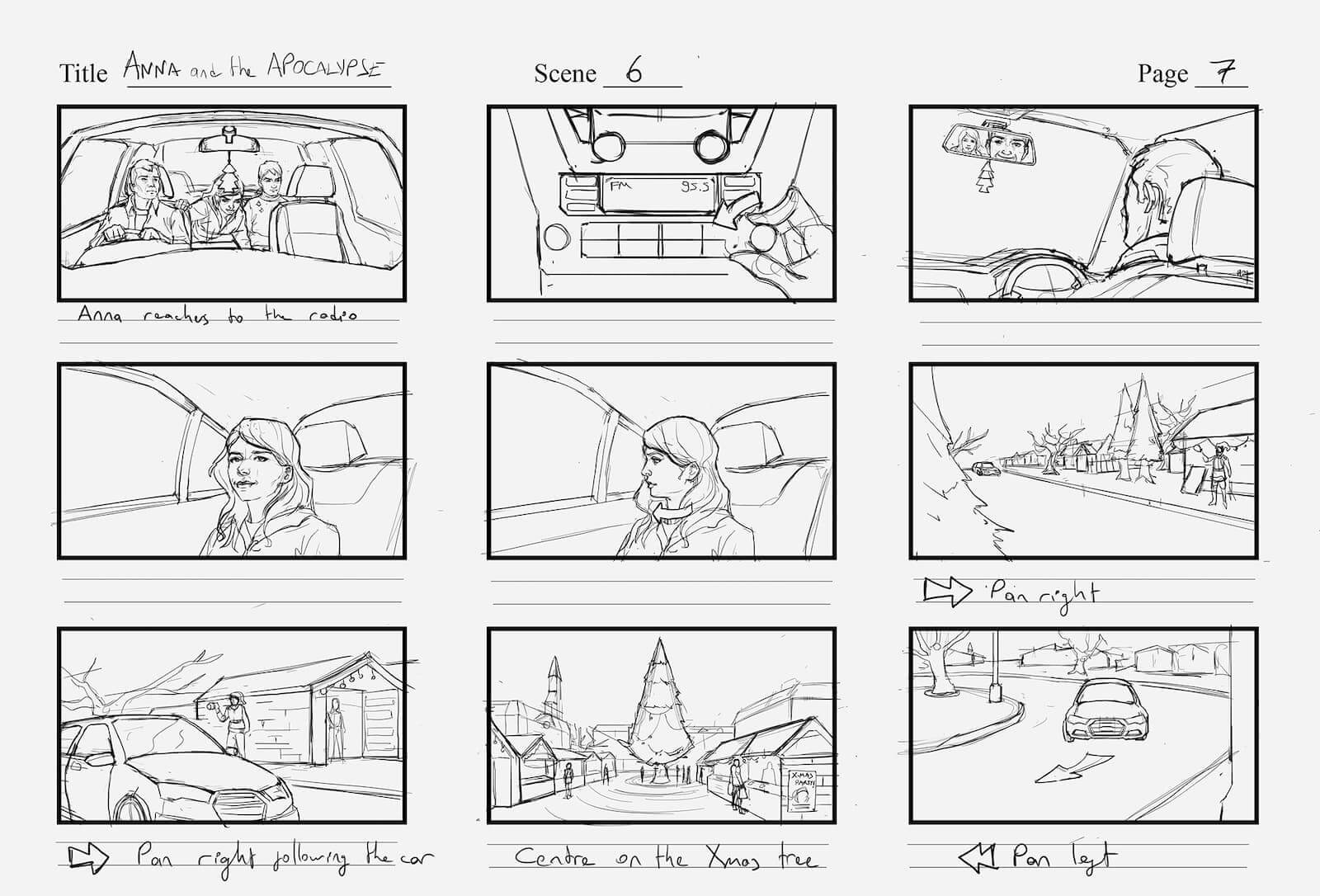
A game storyboard is essentially a visual script, a sequence of drawings or images that represent key moments or scenes in your game. Think of it as a comic book version of your game's narrative and gameplay flow. Each panel in the storyboard depicts a specific action, event, or interaction, complete with notes on camera angles, character expressions, and dialogue. It's a powerful tool for visualizing the overall player experience, from the initial cutscene to the climactic boss battle. But it's more than just pretty pictures. A well-crafted storyboard acts as a communication hub, allowing designers, artists, programmers, and even marketing teams to understand the game's core elements and their intended execution. The storyboard acts as a shared vision, fostering collaboration and minimizing misunderstandings. By creating a visual blueprint of your game, you can ensure that everyone is working towards the same goal, resulting in a more cohesive and engaging final product. It's a flexible and iterative process, allowing you to experiment with different ideas and refine your vision before committing to costly development.
The History and Mythology of Storyboarding
Believe it or not, storyboarding has roots stretching back to the early days of animation and filmmaking. Walt Disney is often credited with popularizing the technique in the 1930s, using it extensively for animated films like "Snow White and the Seven Dwarfs." Before Disney, however, rudimentary forms of visual planning existed in filmmaking and even architectural design. The myth surrounding storyboarding is that it's a rigid, time-consuming process best left to big-budget productions. In reality, storyboarding can be adapted to suit any project size and budget. It can be as simple as sketching out key moments on index cards or as elaborate as creating detailed digital renderings. The key is to find a method that works for your team and helps you effectively communicate your vision. The technique quickly spread to live-action filmmaking, advertising, and eventually, game development. Just as it helped filmmakers visualize their shots and sequences, storyboarding offered game developers a way to map out gameplay scenarios, character interactions, and narrative beats. It became an invaluable tool for pre-production, allowing teams to iron out potential issues and refine their ideas before diving into the complexities of coding and asset creation.
The Hidden Secret of Effective Storyboarding
The true power of storyboarding lies not just in the visuals themselves, but in the collaborative discussions they spark. It's a chance for the entire team to contribute their ideas, challenge assumptions, and ensure that everyone is aligned on the overall vision. Don't treat your storyboard as a static document. Use it as a springboard for creative brainstorming and constructive criticism. Involve your artists, programmers, designers, and even your marketing team in the process. Encourage them to share their perspectives and offer suggestions for improvement. One of the most overlooked aspects of storyboarding is its ability to reveal plot holes, inconsistencies, and other narrative flaws early in development. By visually mapping out the sequence of events, you can easily identify areas where the story doesn't quite make sense or where character motivations are unclear. This allows you to address these issues before they become major problems later on. Embrace the iterative nature of storyboarding. Don't be afraid to experiment with different ideas, scrap scenes that aren't working, and refine your vision based on feedback. The goal is to create a storyboard that is both informative and inspiring, a document that guides the development process while also sparking creativity and innovation.
Recommendations for Storyboarding Tools and Techniques
When it comes to storyboarding, you have a plethora of options available, ranging from traditional pen-and-paper methods to sophisticated digital tools. The best approach depends on your budget, skillset, and the complexity of your game. For those who prefer a tactile approach, nothing beats sketching out ideas on paper. You can use simple index cards, a dedicated sketchbook, or even a whiteboard. This method is quick, intuitive, and allows for maximum flexibility. If you're looking for digital solutions, there are many software options available, ranging from general-purpose illustration programs to dedicated storyboarding applications. Some popular choices include Adobe Photoshop, Storyboarder, and Toon Boom Storyboard Pro. These tools offer features like pre-made templates, drag-and-drop assets, and animation capabilities. Remember, the tool itself is less important than the process. Focus on creating clear, concise visuals that effectively communicate your ideas. Don't get bogged down in technical details or perfectionism. The goal is to quickly visualize your game's key moments and identify potential problems early on. Choose a method that feels comfortable and allows you to iterate quickly.
Embrace Imperfection: The Power of Rough Sketches
Don't strive for perfect artwork in your storyboards. The primary goal is to communicate ideas clearly and quickly. Rough sketches are often more effective than polished illustrations because they encourage feedback and iteration. Think of your storyboard as a living document, a work in progress that evolves as your game development progresses. Embrace the iterative nature of the process and don't be afraid to experiment with different ideas. The beauty of rough sketches is that they allow you to explore multiple possibilities without investing too much time or effort in any one particular concept. They also make it easier for others to provide feedback, as they are less likely to be intimidated by the perceived "finished" quality of a more polished illustration. Remember, the purpose of the storyboard is to guide the development process, not to serve as a final piece of artwork. Focus on conveying the essential information – the action, the setting, the characters, and the dialogue – and let the details fill in as the game development progresses. Embrace the imperfections and use them as opportunities for creative exploration and refinement.
Practical Tips for Effective Game Storyboarding
Before you even start sketching, define your goals. What specific aspects of the game are you trying to visualize? Is it the narrative flow, the gameplay mechanics, the level design, or a combination of all three? Having a clear objective will help you stay focused and create a more effective storyboard. Start with the key moments. Don't try to storyboard every single scene in your game. Instead, focus on the most important events, the pivotal interactions, and the defining moments that shape the player experience. These key moments will serve as anchor points for the rest of the storyboard. Use simple and clear visuals. Your storyboard doesn't need to be a masterpiece of art. Stick to basic shapes, lines, and stick figures to convey the essential information. The focus should be on clarity and communication, not on artistic skill. Add notes and annotations. Use text to supplement your visuals and provide additional context. Describe the action, the dialogue, the camera angles, and any other relevant details. The more information you can convey in your storyboard, the better. Get feedback early and often. Don't wait until you've finished the entire storyboard to share it with your team. Get feedback early and often to ensure that everyone is on the same page and that your ideas are resonating. Be open to suggestions and don't be afraid to revise your storyboard based on feedback.
Visualizing Key Gameplay Mechanics
Beyond narrative sequences, storyboarding can be incredibly useful for visualizing complex gameplay mechanics. Imagine you're designing a stealth game with intricate enemy patrol patterns and environmental interactions. Storyboarding these scenarios can help you identify potential balance issues, refine the enemy AI, and create a more engaging and challenging gameplay experience. For example, you might storyboard a sequence where the player must use a series of distractions to lure a guard away from a key location. The storyboard would depict the player placing a noisy object, the guard reacting to the noise, and the player sneaking past while the guard is distracted. This visual representation allows you to fine-tune the timing, the range of the distractions, and the guard's response to create a satisfying and believable stealth challenge. Furthermore, storyboarding can help you identify potential exploits or unintended consequences of your gameplay mechanics. By visually simulating different player actions, you can uncover weaknesses in your design and address them before they become major problems in the final game. Remember, the goal is to create a fun and engaging experience for the player, and storyboarding can be a powerful tool for achieving that goal.
Fun Facts About Storyboarding in Game Development
Did you know that some game developers use LEGO bricks to create physical storyboards for their games? This tactile approach allows them to quickly prototype level designs and gameplay scenarios. It's a fun and creative way to visualize the game world and experiment with different layouts. Storyboarding can also be a great team-building exercise. Gathering your team together to brainstorm ideas and create a storyboard can foster collaboration and improve communication. It's a chance for everyone to contribute their unique perspectives and feel invested in the project. Another interesting fact is that storyboarding can be used to create marketing materials for your game. A well-crafted storyboard can be turned into a compelling trailer or promotional video, showcasing the game's key features and captivating potential players. The visual nature of a storyboard makes it an ideal tool for capturing the essence of your game and communicating it to a wider audience. It's a creative and effective way to generate buzz and excitement for your upcoming release. Furthermore, storyboarding isn't just for AAA titles. Indie developers can also benefit greatly from visual planning, as it can help them streamline their workflow, stay focused on their vision, and create a more polished and engaging game.
How to Create a Storyboard for Your Game
Start by outlining the key events or scenes you want to visualize. Identify the most important moments in your game's narrative or gameplay. These will serve as the foundation for your storyboard. Next, create a template. Divide a piece of paper or a digital document into panels. Each panel will represent a specific scene or moment in your game. You can use a simple grid or create custom layouts to suit your needs. Now, start sketching. Use simple lines and shapes to represent characters, environments, and objects. Don't worry about creating perfect artwork. The goal is to quickly visualize the scene and convey the essential information. Add notes and annotations to each panel. Describe the action, the dialogue, the camera angles, and any other relevant details. The more information you can convey in your storyboard, the better. Share your storyboard with your team and get feedback. Be open to suggestions and don't be afraid to revise your storyboard based on feedback. The goal is to create a storyboard that is clear, concise, and effectively communicates your vision. Iterate on your storyboard as needed. As your game development progresses, you may need to make changes to your storyboard. Be flexible and adapt your storyboard to reflect the evolving nature of your project.
What If Storyboarding Isn't For Me?
While storyboarding offers numerous benefits, it's not a one-size-fits-all solution. Some developers find that it hinders their creative process or that it's simply not the right fit for their style of game development. If you find that storyboarding feels too rigid or restrictive, there are alternative visual planning techniques you can explore. Mind mapping is a great way to brainstorm ideas and visualize the connections between different elements of your game. It's a more free-form approach that allows you to explore different possibilities without getting bogged down in details. Mood boards can help you establish the overall tone and atmosphere of your game. They're a collection of images, colors, and textures that evoke the desired feeling. This can be especially useful for creating a cohesive visual style and ensuring that all of your assets align with the overall vision. Prototyping is another effective way to visualize your game's mechanics and gameplay. By creating a simple playable prototype, you can test out different ideas and get a feel for how they work in practice. This can be especially useful for identifying potential problems and refining your design early on. Ultimately, the best visual planning technique is the one that works best for you and your team. Experiment with different approaches and find the one that allows you to effectively communicate your vision and create a compelling game.
Top 5 Reasons to Use Storyboards for Game Development
Here's a quick listicle summarizing the key benefits of using storyboards in your game development process: 1. Improved Communication: Storyboards provide a clear visual representation of your game's narrative, gameplay, and user interface, ensuring that all team members are on the same page.
2. Enhanced Collaboration: Storyboarding fosters collaboration by providing a shared platform for brainstorming, feedback, and idea generation.
3. Early Problem Detection: By visualizing your game's key moments, you can identify potential plot holes, inconsistencies, and gameplay issues early in development.
4. Streamlined Workflow: Storyboarding helps to streamline the development process by providing a clear roadmap for artists, programmers, and designers.
5. Increased Creativity: Storyboarding encourages experimentation and innovation by allowing you to explore different ideas and refine your vision before committing to costly development. Incorporating storyboarding into your workflow can significantly improve the quality and efficiency of your game development process.
Question and Answer About Storyboard for Games: Visual Planning for Game Development
Q: Is storyboarding only for narrative-heavy games?
A: No, storyboarding is useful for any type of game, regardless of its narrative focus. It can be used to visualize gameplay mechanics, level design, user interface, and even marketing materials.
Q: What if I'm not an artist? Can I still create a storyboard?
A: Absolutely! Storyboarding is about communication, not artistic skill. Stick figures and simple shapes are perfectly acceptable. The focus should be on conveying the essential information clearly and concisely.
Q: How much time should I spend on storyboarding?
A: The amount of time you spend on storyboarding will depend on the complexity of your game and your team's needs. It's best to allocate enough time to thoroughly visualize your key moments and get feedback from your team.
Q: What are some common mistakes to avoid when storyboarding?
A: Some common mistakes include creating overly detailed artwork, neglecting to add notes and annotations, and failing to get feedback from your team. Remember, the goal is to communicate your vision effectively, not to create a masterpiece of art.
Conclusion of Storyboard for Games: Visual Planning for Game Development
In conclusion, storyboarding is a powerful tool that can significantly enhance your game development process. By embracing visual planning, you can improve communication, foster collaboration, identify potential problems early on, and ultimately create a more engaging and polished game. Whether you're an experienced game developer or just starting out, incorporating storyboarding into your workflow can help you bring your creative vision to life.
Post a Comment